Testing Page for 2024
Tuesday, December 31, 2024


Saturday, December 30, 2023
Saturday, December 31, 2022
Wednesday, May 26, 2021
High Alert- Threat for Offensive Security Students/Alumni in the name of Academic Policy
Here I am posting all my issue since I won’t get any answer
from offensive security or they won’t
respond for my email. I want to strongly record this case to all our security
community how offensive security treading their students/Alumni in the name of Academic
Policy.
Let me give short intro about myself I completed my OSCP in
the year of 2018 with lot of struggle and cleared the exam in first attempt. By
2020 I plan to prepare OSWP and I purchased
the course materials on the date of June 27th 2020 and I appeared
for exam on Sat,25 Jul 2020 but unfortunately failed on my first attempt the
reason behind failed was exam machine was not working properly I failed to
contact support via online but email them to seek help but that case not worked
for me and I failed.
Here screenshot for your reference

After little break, I plan to re-appear for my exam and mean
time one of my junior guys who worked along with me also like to prepare for OSWP.
So, I have suggested him to check the offsec website and guide him to buy the
course and he did in the same way. and parallelly he started to prepare his
exam And In mean time I booked my exam
slot on Tue,23 2021.
I was getting ready for my exam with little tension and exam
starts like as usual after got VPN and machine access I was checking all
AP(Access Point) again the machine was not working like first time. But now I know
how to sort out this issue I contacted the support team for help they checked
the machine and reset the all AP and we both know(myself & Offensive
Security) there was issue with AP but still off sec not agree with there
mistake and finally they given me one hour extra time to write exam.
Online Chat Transcript screenshot:

Here is the below screenshot of the email

After lot of struggle I submitted the exam documentation and
I got pass email from off sec and I was very happy that time.
After a 2 week of time on April 8th 2021 I got a
one more email from offensive security which
is little surprise for me


I could not get any clue what happening surrounding me and
suddenly got little tension and reply them
like below screenshot
And I was keep on worrying what to do next and no clue suddenly my junior guy called me and explain he also got same email like above one we both are in confused state and don’t know what to do. And he responds to off sec team with his justification.


After long time of analysis of both reporting structure we got to know the login IP of exam which we wrote was same IP and it was a static IP which belong to office network and its not belong to personal one. As per the offensive security Academic Policy it does not state no student should not write exam on office network or by using the Static Ip. Its only state no student should not help each other or not to share any information during or after exam or before exam that we followed very strictly.


It was clearly mentioned in the screenshot of different time and date
of login but offensive security market this one as integrity of our
Certifications is breached. And more over as per there policy we not
helped each other during exam and we not appear for exam on same date or time.
Due to static IP address they are treating us in such a wrong way

Here my list of Question to offensive Security
Question: Since you were saying I was breached
Academic policy by sharing the exam report or Reporting information.
Answer: We both download the exam template from offensive
security website and we both not shared to each other. You have our both
reporting copy and you can do the investigation, but you did not do in that way
and more over you have plagiarism Algorithm to identify the cheater so you can
upload both report to get evidence but you not did in that way too.
You have only IP in both reporting document that too static IP
which does not mean we did malpractice in exam.
Question: you did investigation for more than 45 days
to get an evidence but unfortunately you don’t have enough evidence to prove my
suspicious activities like we both did cheated.
So finally, you market with tag name by sharing the exam
report or Reporting information tag and revoked my certificate
Question: Do offensive security thinking no student
or Alumni should not ask any question to offsec for wrong action against the
student.
My final justification for offensive Security
I am 200% sure you were not done the proper investigation on
my reporting part and you want to show case your self as big one and no one
should ask question.
I will make sure to whole offsec world what is happened to my case and I want to
expose what kind of activities you guys are doing to the Student who paid their
hard-earned money for their carrier growth.
It does not mean offensive security won’t do any mistake in their
operation. Yes, even you guys do mistake
not only student I want to prove that you guys did mistake from my case.
Tuesday, December 22, 2020
How to Build an IMSI Catcher to Intercept GSM traffic
This article provides practical information on how to sniff the traffic of a GSM Network and will follow the structure below:
1. Background
2. Architecture of GSM
3. What is IMSI Catcher?
4. How IMSI Catcher works?
5. Hardware and Installation of tools
6. Capturing the GSM traffic
7. Detection of IMSI Catcher
1. Background
Before we delve deeper into the subject, some basic terminology and background information on GSM are provided below.
What is SDR?
Software Defined Radio is a radio broadcast communication technology, which is based on a software-defined wireless communication protocol instead of being implemented through hard-wires. SDR allows easy signal processing and experimentation with more complex radio frequency builds.
What is RTL-SDR?
RTL-SDR is a Realtek (RTL2832U) TV stick. TV sticks allow transmission of raw I/O samples, which can be used for DAB / DAB + / FM demodulation.
What is GSM?
GSM stands for Global System for Mobile communication. More than 5 billion people use GSM technology to communicate all over the world. Operators in every country use a different frequency in the GSM possible spectrum. Refer to https://www.worldtimezone.com/gsm.html to learn more.
What is IMSI?
IMSI stands for “International Mobile Subscriber Identity” and is globally unique for each subscriber. The IMSI consists of 15 digits, which contain the Mobile Country Code (MCC), Mobile Network Code (MNC) and the Mobile Subscriber Identification Number (MSIN). The IMSI is stored in the Subscriber Identity Module (SIM).
Mobile Phone Generations
1G - The first generation of mobile phones was implemented in the 1980s. The data sent from and to the phones were analogue and naturally had no security whatsoever. Additionally, it was only possible to make voice calls with 1G networks. Text messaging was not yet possible at that point.
2G - In the 1990s the second generation of mobile phone technology was rolling out. Features such as SMS, data, MMS, voice mail and call forwarding were implemented. Also, the radio signals became digital and were encrypted. Later 2.5G and 2.75G were introduced and both implemented improved techniques for data transfer such as GPRS and EDGE. The Global System for Mobile Communication (GSM) standard is the most widely used 2G standard and as of 2007, the most widely used mobile phone protocol in general.
3G - 3G was slowly rolled out in the 00s. The International Telecommunication Union (ITU) set up specifications that label certain mobile networks as 3G. 3G mobile networks support Global positioning system (GPS), mobile television and video conferencing. It also offers way more data transfer bandwidth and speed. Furthermore, the encryption standard is improved: using two-way authentication between the mobile phone and the base station and having improved encryption standards.
4G - 4G is also specified by the International Telecommunication Union (ITU). One of the requirements of 4G is a speed of 100 Mbit/s in a car or train and 1 Gbit/s for pedestrians. A 4G internal network is also completely IP based, so no more circuit-switched telephone. It must be noted that the current 4G standards are not actually fully compliant yet with the ITU specifications. However, they are still considered 4G since they are the closest to 4G speeds and are substantially better than 3G technologies.
5G - The next-generation of telecom networks (fifth generation or 5G) started hitting the market at the end of 2018 and will continue to expand worldwide. Beyond speed improvement, 5G is expected to unleash a massive IoT (Internet of Things) ecosystem where networks can serve communication needs for billions of connected devices, with the right trade-offs between speed, latency, and cost.
2.Architecture of GSM
The following Diagram presents the basic architecture of the GSM network

2Mobile Station (MS)
The mobile station is a device that can access the GSM network via radio. The mobile station can be broken down into two separate parts, the mobile hardware and the SIM card.
Base Station (BS)
Base Station is the antenna and is also called the “cell tower” or “cell site”. One BS covers a cellular area in the cellular network. The size of this cell can vary from a few hundred meters to several kilometers. The size of the cell area depends on the landscape features and the population density of the area. In subway stations and large buildings, relay stations can be placed to act as repeaters. These relay stations then wire the signal to the nearest base station.
Base Station Controller (BSC)
The base station controller controls several base stations. It handles the session handoffs between the different base stations when a user is moving through different cells. If the base stations are not connected to the same BSC, then the Mobile Switching Center (MSC) handles the handover.
Mobile Switching Center (MSC)
The mobile switching center is responsible for managing the authentication, handover to the other BSCs and routing calls to the landline.
Visitor Location Register (VLR)
Each MSC has its own Visitor Location Register (VLR). The VLR holds subscriber information of subscribers that are under the care of the MSC (which are copied from the Home Location Register (HLR)). The VLR, for example, holds the Temporary Mobile Subscriber Identity (TMSI), which is a temporary alias for the IMSI. This is to reduce the frequent broadcasting of the IMSI.
Home Location Register (HLR)
The HLR stores personal subscriber information like the IMSI and the phone number. There is only one HLR for every GSM network provider.
Authentication Center (AUC)
The Authentication Center (AUC) handles the authentication process of a subscriber to the network. More specifically, the AUC holds the shared secret key and generates the random challenge that is used to authenticate.
3.What is an IMSI Catcher?
An IMSI Catcher is an intrusive piece of technology that can be used to locate and track all mobile phones that are switched on in a certain area.
The IMSI Catcher does this by ‘pretending’ to be a mobile phone tower - tricking your phone into connecting to it and then revealing your personal details without your knowledge.
IMSI Catchers are indiscriminate surveillance tools that could be used to track who attends a political demonstration or a public event like a football match. They can even be used to monitor your calls and edit your messages – and you wouldn’t even know it was happening.
4.How IMSI Catcher works?
IMSI Catchers are devices that act like fake cell towers, which trick a target’s device to connect to them and then relay the communication to an actual cell tower of the network carrier. The target’s communications in the form of calls, text messages, internet traffic etc. go through the IMSI Catcher, which can read messages, listen to the calls and so on. At the same time victim will have no knowledge that this is happening as everything will seemingly work as normal. This is referred to as Man-In-Middle attacks in security fields.
This is possible because of a loophole in GSM protocol. Mobile phones are always looking for the mobile tower with the strongest signal to provide the best commutation. This is usually the nearest one. At the same time, when a device connects to a cell tower, it authenticates to it via an IMSI number. However, the tower doesn’t have to authenticate back. This is why every time someone places a device that acts as a cell tower near your phone, it would connect to it and give away its IMSI.

How does an IMSI Catcher find out my identity?
IMSI is a number unique to your SIM card. Once your phone is tricked into connecting to an IMSI catcher, it reveals this unique number. Once the police have your IMSI, they can easily determine your identity.
How does an IMSI Catcher find out my location?
Once your phone has been tricked into revealing its IMSI, the IMSI catcher can determine your phone’s general location by measuring the strength of the signal from the phone. Measuring the strength of the signal from different locations permits an ever-more precise determination of the phone’s location.
Can an IMSI Catcher snoop on my calls and text messages?
Yes. Some IMSI Catchers can ‘intercept’ your text messages, calls and Internet traffic. This means others can read or listen to your personal communications. IMSI Catchers can even re-route or edit communications and data sent to and from your phone. IMSI Catchers can also block service so you can no longer use your phone to make or receive calls and text messages – even for emergency calls.
5.Hardware and Installation of tools
Hardware
Any of the hardware below can be used for practical purposes.
RTL-SDR
Hackrf
USRP
Blade-RF
Software
The following software tools are required for practical purposes.
GR-GSM - A python module, which is used for receiving information transmitted by GSM.
Wireshark - Capturing the wireless traffic.
IMSI-Catcher - This program shows the IMSI number, country, brand and operator of cellphones.
GQRX – Software defined radio receiver.
RTL-SDR Tools – Get the information of the RTL SDR dongle.
Kailbrate – Determine the signal strength.
Installation of Wireshark, GQRX, GR-GSM, rtl-sdr
sudo apt-get update
sudo apt-get install gnuradio gnuradio-dev git cmake autoconf libtool pkg-config g++ gcc make libc6 libc6-dev libcppunit-1.14-0 libcppunit-dev swig doxygen liblog4cpp5v5 liblog4cpp5-dev python3-scipy gr-osmosdr libosmocore libosmocore-dev rtl-sdr osmo-sdr libosmosdr-dev libboost-all-dev libgmp-dev liborc-dev libboost-regex-dev python3-docutils build-essential automake librtlsdr-dev libfftw3-dev gqrx wireshark tshark
git clone -b maint-3.8 https://github.com/velichkov/gr-gsm.git
cd gr-gsm
mkdir build
cd build
cmake ..
make
sudo make install
sudo ldconfig
export PYTHONPATH=/usr/local/lib/python3/dist-packages/:$PYTHONPATH
Installation of Kalibrate
sudo apt-get update
git clone https://github.com/steve-m/kalibrate-rtl
cd kalibrate-rtl
./bootstrap && CXXFLAGS='-W -Wall -O3'
./configure
make
sudo make install
Installation of IMSI Catcher
sudo apt install python-numpy python-scipy python-scapy
git clone https://github.com/Oros42/IMSI-catcher.git
6.Capturing the GSM traffic
For this practical, the RTL-SDR dongle was used. Once the tools installation process is complete, plugin the RTL-SDR USB dongle to your system.Open the terminal and run the below command to check the dongle has been plugged in successfully.

In
India Mobile GSM networks work on 900MHz and 1800MHz frequency bands (Uplink
and Downlink).
The help guide of the “grgsm
scanner” tool.

Search for nearby GSM base stations
using “Kalibrate” or “grgsm_scanner” tools.

Three
base stations were found. The signal mentioned above was relatively strong with
a frequency of 945.4MHz and 945.6MHz.
In the above manner, we obtained
some parameter information of the base station, such as: center frequency,
channel, ARFCN value, LAC, MCC, MNC value, etc.
With the above details, we want to
sniff the base station frequency. For that the program called “grgsm_livemon”
will be used.
The help guide of the
“grgsm_livemon” tool.

Run the “Wireshark” before running the “grgsm_livemon” tool to capture the packets. Select any interface to capture all the data.

Once the sniffing of the frequency starts, a popup window appears, as shown in the screenshot below.

The frequency button needs to be moved in order to capture the frequency. Once data capture starts it will look like the screenshot below.

Now we need to capture the IMSI details with the help of an “IMSI Catcher” tool.

To capture the IMSI and other details like TMSI, Country, Brand, Operator, MCC, MNC, LAC, Cell-ID etc., run the “IMSI Catcher” tool.

In Wireshark, the captured data of base station’s MNC, MCC, LAI and other information can be seen.

7.Detection of IMSI Catcher
There are different applications available, which help to find the IMSI Catcher in your location. Once it is installed in mobile, it will automatically detect the IMSI Catcher. Applications contain a database of all the cell towers of mobile carriers in different countries and regularly update this list.
Every time it detects a cell tower,
it checks the list to see if it exists. If it exists, then it is a legitimate
one, and there is no danger. However, if the tower is not on the list, there is
something suspicious going on – and there is a high probability that this is an
IMSI Catcher.
In this case, the best you can do is
to turn off your phone and turn it on again, once you reach a safe location.
Below are some of the IMSI Catcher
detector applications:
·
Osmocom – used to detect and
fingerprint certain network characteristics
·
Android IMSI-Catcher Detector
·
SnoopSnitch
·
Cell Spy Catcher
·
GSM Spy Finder
Notes: This article is only for
study purposes and should not be used for illegal activities. It only discusses
the interception of GSM data and not cracking. Illegal wiretapping is a serious
breach of the law in most countries.
Thursday, August 8, 2019
Protecting Your Internet of Things- The Ultimate Security and Privacy Guidelines
Mozilla's Minimum Security Guidelines
Mozilla outlines the need for security policies essential to maximize the protection of IoT devices and recommendations for manufacturers to enhance transparency and communication.
Mozilla’s minimum security guidelines are unique as they take into account all the life-cycle (long-term sustainability), security, privacy as well as interoperability issues while others focus mostly only on one at a time. Secondly, it addresses the entire IoT ecosystem including sensors, devices, mobile apps, back-end services rather than focusing on just the devices.
Serving as a risk assessment guide for developers, the goal of Mozilla guidelines is to highlight the devices which meet these standards to help consumers make informed decisions
Five Minimum Security Standards-
Encrypted Communications- The devices and applications should support security best practices and strong cryptography protocols, all the personal data in transit and in storage must be encrypted. The IoT support websites must also fully encrypt the user session by including best practices like HTTPS and HSTS (aka AOSSL) along with back-end services authentication. They must also implement server configurations, regular monitoring and improvement of site security to reduce the impact of vulnerabilities. Semi-annual penetration tests are also recommended.
Security Updates- The product must be capable of receiving automated security-related updates. Automated updates provide users with the ability to approve or reject the updates. A secure automated mechanism must be in place to deliver the updates, patches and revisions seamlessly after the vulnerability disclosure. Also, the vendor must disclose what actions will be required from the consumer end for correct and timely updates and that the updates are verified to be coming from a trusted source. Devices should be made available to the customer with current software and on first boot should push automatic updates to address any known critical vulnerabilities.
Vulnerability Management- A coordinated vulnerability disclosure mechanism must be established which includes receiving, tracking and responding promptly to external vulnerability reports from third parties. Vendors must also re mediate design threats and vulnerabilities post product release either through remote updates or through actionable consumer notifications. Crowd-sourcing methods and bug bounty programs must be used by the developers to identify vulnerabilities.
Strong Passwords- The device must include strong authentication by default with the use of secure certificate credentials or single use and unique passwords for administrative access, including having password strength requirements. Authentication credentials shall be salted, encrypted or hashed to help prevent brute force attacks and other abusive login attempts such as automated login bots etc. Providing recovery mechanisms, credential reset mechanism using multi-factor authentication and verification (by, email etc), notifying users of password change, locking/disabling support accounts after several invalid login attempts help protect the device from vulnerability to guessable password attacks.
Privacy Practices- The device must have privacy and support policies that are clear, easily discoverable and readily available for user review prior to the product purchase or activation. Utilization of user-friendly short URLs, QR codes, and prominent placement of policies on product packaging and product website is recommended for companies. Beyond product warranty, duration and end-of-life security and patch support should be communicated to the consumer prior to purchase along with any subscription to an annual support agreement. The vendor must disclose what sensitive information will be collected by the device and how it will be used for its functionality. Ownership, data transfer mechanisms, storage duration, retention policy must be disclosed by the vendor and the users must be able to review and edit privacy preferences including the ability to reset to the “factory default” and, as in line with GDPR, there should be a way to opt-out of such practices. IoT device must request user confirmation when initially pairing/connecting with other devices and services. Also, vendors must take consumers’ affirmative consent before sharing their personal data with the third parties and should provide the ability to delete or make anonymous the stored data on company servers upon loss or discontinuing use of the device.
GSMA IoT Security Guidelines-
GSMA (GSM Association or Global System for Mobile Communications) Guidelines help promote best practices for secure design, development and deployment of IoT products and provide a mechanism to address security challenges and risk assessments.
GSMA recommends the following high-level steps at the early development stages of IoT product/service for mobile network operators worldwide to minimize any privacy risks:
- Determine what user data needs to be collected for the proper functioning of a new IoT offering. The data can be either static such as name and address or dynamic (real-time) such as a user’s location. It is also necessary to decide whether user consent is required to use or collect that data, what will be the means of obtaining consent and how to offer the user options to control their privacy preferences.
- Next step is identifying legal compliance requirements―whether the collected data is personal and subject to data protection laws. Also, whether any privacy-related license conditions are to be fulfilled to process such data.
- After identifying data protection and privacy requirements, the next step is to ensure that data is secured both in storage and during transmission, data flows are clearly set i.e. how data will be used and who it will be shared with and for what purposes. Also, keep appropriate contractual agreements (that include consequences and liabilities if failed to comply) in place with the companies you are sharing data with.
- Conducting a Privacy Impact Assessment (PIA) is becoming common in privacy regulations. It takes into consideration any privacy risks that can be raised for consumers due to possible misuse of their personal information, reducing the associated risks and designing a more effective process for handling individual data.
- After privacy risk assessment, it is required to increase consumers’ awareness about what data they are sharing through their device, the possible dangers, steps to mitigate them as well as allowing them to define their privacy preferences. This helps in building user trust since they become reassured of having more control over their data.
- The IoT product/service may collect data that is not classified as ‘personal’ but when integrated with data from other sources may give information about the user that might have privacy implications on the consumer. This should, therefore, be considered early on. Such implications must also be considered in case the offered product/service is likely to change in the future (e.g. more data collection, data sharing with a new party). Consumers must be informed of any such changes and their consent must be taken along with providing the means to change their privacy preferences and clear redressal process so that user know who to turn to if they suffer from a privacy breach.
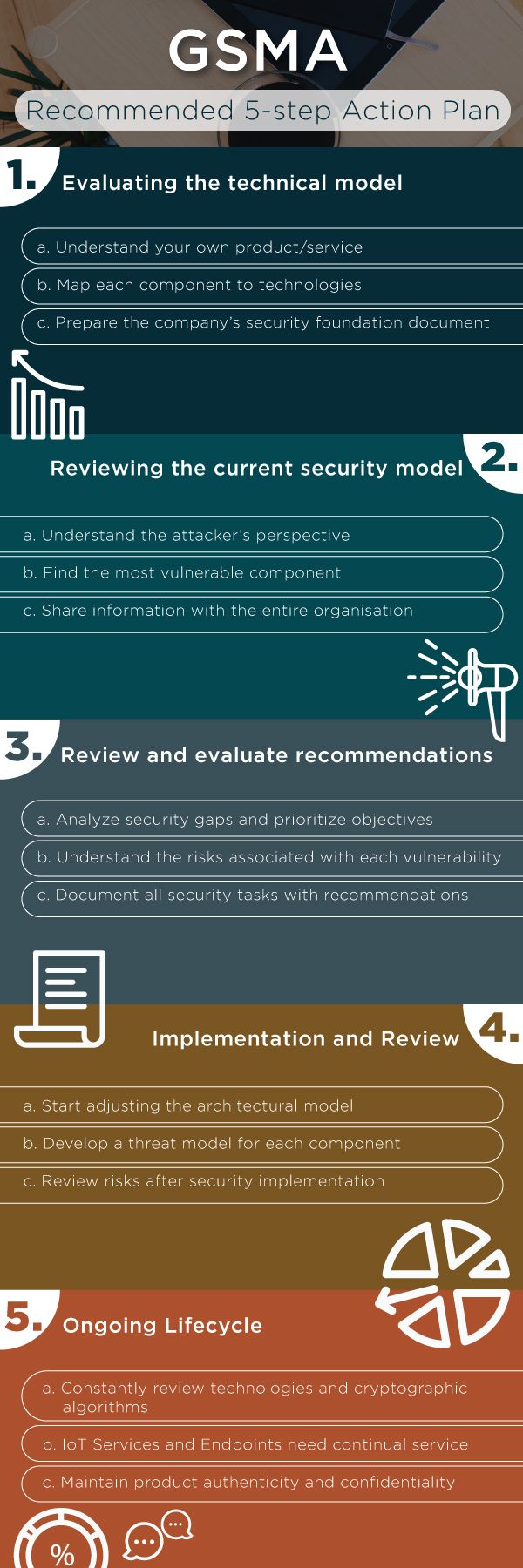
NIST Cybersecurity Guidelines
National Institute of Standards and Technology (NIST) promotes awareness of 17 technical concernsthat can affect a user’s level of confidence (trust) in IoT. Most of these trust-related concerns have no current resolution but wherever possible NIST has recommended steps to mitigate them. These guidelines should be of interest to technical staff, managers, policy makers, government, or any other IoT integrator/adopter.
The following IoT trust concerns must be addressed before and after deploying IoT systems:
Scalability- The combinatorial explosion and functionality bloat caused by the inter-connectivity of a large number of things and networks are the trust concerns. This allows connectivity, complexity, energy and bandwidth demands to skyrocket causing difficulty for testing, performance and security. By limiting internet access for a specific network of things, the threat space can be reduced and testing becomes more thorough.
Heterogeneity- Competition in the marketplace causes this trust concern resulting in lower prices but also ‘emergent behaviours’ that create new vulnerabilities as well as impact performance and reliability. Heterogeneity-related vulnerability issues also generate with supply chain applications.
Ownership and Control- Integration of third-party black boxes is of concern, particularly for security and reliability. Black box devices aren’t observable and have no transparency and can contain malicious trojan behaviours. The loss in access to internals functionality limits the trust of the IoT adopters in their systems. Risk assessment such as white-box testing approaches should continue throughout operation and deployment to mitigate risks.
Composability, Interoperability, Integration and Compatibility- Composability trust depends on the working of IoT hardware and software components. Right component selection, security & reliability of the components, specification & architecture of the IoT system itself affects this concern. Further concerns arise if the components cannot work in conjunction without conflict, cannot be swapped as per system requirements, or cannot communicate properly. Therefore proper inspection of each component before the adoption is necessary. To address these issues, it is important to understand the actual behaviour of the “things”, their environment, context, operating time, communication channels and application of architecture principles and risk assessment and mitigation approaches.
Ilities- Ilities are the non-functional requirements that state the level of quality a system should exhibit both for the functional requirements (what a system shall do) and negative requirements(what a system shall not do). The concern is that there are dozens of ilities and most are not easily measured. On top of that, some of the ilities are in technical conflict so a system cannot have high levels of all. Ranking them on basis of importance, level and cost is a challenge for IoT adopters. It is recommended to consider ilities on a case-by-case basis at the beginning of the IoT system’s life cycle.
Synchronization- Being distributed computing systems, IoT devices have numerous computations and events occurring in parallel for which some degree of synchronization is needed. For that to occur a timing mechanism is needed however no such global clock exists resulting in timing anomalies, poor performance and vulnerabilities. Timing being a vital trust component, central timestamping authority for all events would be beneficial.
Measurement- Lack of metrics and measures for the Internet of Things makes it difficult to trust the system or even estimate the amount of testing it should receive. Since IoT is a relatively new set of technologies, scarce availability of these “keystones of trust” is a matter of concern. Static testing eg. code checking for vulnerability detection can be added to the list.
Predictability- The trust issue stems from the inability to assure how the components of the IoT system will perform and interact and whether they will provide the specified resources and functions whenever needed.
Testing and Assurance- Greater interdependencies in the IoT system creates additional testing difficulties/challenges compared to the conventional systems. Most IoT systems are built from black box devices & services that offer no transparency into their internal workings. Also, being highly data-driven, IoT devices need to assure data integrity and resilience to data anomalies. Array generation algorithms, methods based on combinatorics and design of experiments work extremely well in testing complex interactions.
Certification- Certification often causes conflict and is unlikely to offer the required degree of trust because of unacceptable answers to questions such as what will be the criteria for selection and who will perform certification, lifespan of device relative to the time required for its certification, impact on market launch if system gets certification prior to operation etc. A good first recommended step here is to define the type of concerned quality.
Reliability- It will rarely be possible to claim that the IoT system is reliable as it depends on the resilience to handle any anomalous event that the system can experience and the correct knowledge of the context and environment.
Data integrity- The quality of data to and from the IoT system determines whether it is fit-for-purpose. Availability, fidelity, accuracy and confidence against data tampering are the factors that impact the ability to trust data. Data storage is another major concern as leased data can originate from anywhere, be it cloud.
Excessive data- IoT systems are data-driven and their rapidly changing workflow generates and receives huge amounts of data, guaranteeing the integrity of which is a trustworthiness concern.
Performance- The increased computational speed and data generation is a concerning situation. This inhibits auditing transactions as the rate of data generation exceeds the speed of storage. This, in turn, makes correcting computations, failure recovery and real-time forensic analysis harder because of lost data/data anomalies and inability to meet computational deadlines.
Usability- Whether users understand how to use the devices is an important consideration. Limited display size, functionality and parameter control accessibility only via remote means have significant implications over user trust.
Visibility & Discovery- When technologies become so ingrained in the user’s daily life that they become invisible to them manifests a trust concern. For example, using voice response technologywhen you talk to your device, how do you know if it is the only system listening? Discovery trust concern stems from the fact that IoT devices have enabled many new protocol families, causing a vast number of possible interactions that are prone to reliability and security problems.
Security- It is a concern for all ‘things’- network, timing and devices themselves. Sensors and data may be transmitted and accessed by unauthorized parties for malicious intent. Data may be flawed (partially/totally), dropped, tampered with, stolen. Malicious tampering with sensors may cause loss of sensitivity/calibration. Communication channels and data aggregators are also prone to malicious disturbances such as false data feed or inability to execute data. Unique identifiers help partially mitigate this problem by attaching RFID (Radio Frequency identifier) tags to physical primitives. RFID readers distributed at key points throughout the network activates a tag and cause it to broadcast radio waves within the government-reserved bandwidths for RFID usage.
The actual time at which computations are performed or an event in a workflow is generated may also be tampered with by changing the recorded time. Hackers can affect the execution of decision triggers by inducing delays (eg. sticking in a delay() function call).
Conclusion-
The Internet of Things begins with your things—the things that matter most to organizations. IoT can convey amazing value to a business by expanding revenue, decreasing costs, and transforming business. The success of this change to a great extent relies upon customer satisfaction and buyer protection. That implies finding a provider that catalyzes this compliance by understanding business needs and prerequisites, or compliance to security guidelines by providing specialised training to your team with compliance, privacy, security, and transparency as major considerations. Attify has broad involvement with creating IoT Security benefits and specializes in training, ranging from beginner to advanced levels in the domain of IoT & Mobile Security.
Friday, August 5, 2016
IoT - The Next level of Terrorism
I would like to recommend the following article which talks about the vulnerabilities caused by the sensors and Internet of Things(IoT) devices. It would be real eye opener for security specialist, developers and architects who are working in the IoT space. Worth reading it !

Wednesday, February 10, 2016
Cloud Based Security Testing Scanner For Mobile Application
Hi guys i have created my own Cloud Based Security Testing Scanner to make Code review,Reveres Engineering etc for Android Application (.APK) all the test will be performed according to the OWASP Standard .If any one want to perform the security Testing for android means i can help you for free.

The report will be generated in PDF format and in that report suggestion will be given to solve the bug.For further info you can check the Screen Shot which i am attaching below


For more details u can contact me @
SKYPE: svkmr57
yahoo: svkmrit@yahoo.com
gtalk: svkmrit@gmail.com
Monday, August 24, 2015
VMWare Player Version Issues
May be my post help to some one and I got this error: Invalid configuration file. File “filename.vmx” was created by a VMware product with more features than this version of VMware Player and cannot be used with this version of VMware Player. Cannot open configuration file filename.vmx.

Search engine results were not plentiful. I finally found the solution here. What had happened was that the virtual machine I was trying to open had been created in a newer version of VMWare (4.0) than my Player was (3.1.4). By opening the vmx file in notepad and changing the line virtualHW.version = “8″ to : virtualHW.version = “7″, I was able to open the virtual machine and carry on. The other option is to do a free upgrade of your version of VMWare player. The problem is the error message doesn’t tell you that clearly.

Search engine results were not plentiful. I finally found the solution here. What had happened was that the virtual machine I was trying to open had been created in a newer version of VMWare (4.0) than my Player was (3.1.4). By opening the vmx file in notepad and changing the line virtualHW.version = “8″ to : virtualHW.version = “7″, I was able to open the virtual machine and carry on. The other option is to do a free upgrade of your version of VMWare player. The problem is the error message doesn’t tell you that clearly.
Wednesday, April 15, 2015
Tips To Make Your iPhone Secure

Kaspersky Lab has discovered a vulnerability in the Darwin kernel of the Apple operating system that if exploited, leaves OS X and iOS 8 devices exposed to the remote activation of denial of service attacks on the devices.
Keep in mind that doing everything we mention here will deprive your iPhone of some of its helpful features, but at the same time it will better protect your private data. You don’t have to follow all of the tips, so feel free to choose what you’re ready to sacrifice for the sake of security — it’s completely up to you.
1.Use a strong password instead of a 4 digit code
The simplest and most efficient way to protect your data is to use a strong password instead of a simple 4 digit pin code for unlocking your iPhone. It’s a good idea to use a combination of letters, digits and symbols. It’s even better if the password is requested immediately after the lock screen, without any delay. As an extra option, you can also turn the “erase data” feature on, so the device will wipe everything from its memory after 10 failed passcode attempts. But keep in mind that all the data will be erased forever and you won’t be able to recover it, so it’s best not to forget your password.How will it help? It will reduce the chances of a criminal being able to guess your password.
Where can you set these requirements? Go to “Settings” –> “Passcode” (or “Touch ID and passcode”) –> “Require passcode: immediately”; “Simple passcode: off”
2.Turn off lock screen notifications
Any password, even the strongest one, won’t prevent your data from being revealed if it appears on a lock screen. Messages, emails, and other information in your apps can contain some sensitive data like confirmation codes, private appointments, financial data, etc. The less your iPhone shows on a lock screen, the safer your data is.
How will it help? It won’t let strangers oversee information showing up on a lock screen.
Where can you set these requirements? Go to “Settings” –> “Passcode” (or “Touch ID and passcode”) –> “Allow access when locked” section.
3.Turn on two-step verification for Apple ID and iCloud
One lock is good, but two is better. That’s why it’s highly recommended that you set up two-step verification whenever it’s available for Apple ID and iCloud. When you set up two-step verification, you register one or more trusted devices (devices you control) that can receive 4-digit verification codes using either SMS or the Find My iPhone service. Then, any time you sign in to manage your Apple ID, sign in to the iCloud, or make an iTunes, iBooks, or App Store purchase from a new device, you’ll need to verify your identity by entering both your password and a 4-digit verification code.
How will it help? It will prevent your Apple account from being used by somebody that is not authorized.
Where can you set these requirements? Go to https://appleid.apple.com –> “Manage your Apple ID” –> “Password and Security” –> “Two-Step Verification”.
Anybody can use Siri on a lock screen while you’re away from your iPhone.
4. Disable Siri on a lock screen
Anybody can use Siri on a lock screen while you’re away from your iPhone.
Siri is a great Phone feature, but sometimes this nice personal assistant can give away some information that you would prefer to keep confidential. It’s not necessary to turn it off completely, but you will be much more secure if you prevent it from activating from a lock screen or on a “Hey Siri” voice command. Don’t forget: Siri can communicate with anyone, not just with an owner of the device it works on.
How will it help? It will eliminate the possibility of data extraction from the smartphone using Siri.
Where can you set these requirements? Go to “Settings” –> “Passcode” (or “Touch ID and passcode”) –> “Allow access when locked” section –> “Siri: off” and “Settings” –> “General” –> “Siri” –> “Allow “Hey Siri”: off”.
5. Turn off automatic sync to iCloud
As you might know, a lot of pictures from a recent leak were originally stored on Apple’s iCloud servers, which drove many celebs crazy. They thought that deleting a photo from a phone would solve the problem, but it doesn’t: after syncing to the “cloud” the data stays there, even if you get rid of it locally. Actually it happens with almost any kind of data if we are talking about iPhones and iCloud: messages, notes, contacts, documents — everything syncs automatically unless you turn it off. And that’s what we’d recommend, especially if you have just a couple of Apple devices and don’t need to sync them on a daily basis.
How will it help? It will reduce the risk of compromising your data while it’s on the iCloud servers, or if you loose one of your Apple devices.
Where can you set these requirements? Go to “Settings” –> “iCloud”
6. Turn off cookies in your browsers
Cookies are small files which almost any website generates and leaves on your device. They may contain some information about you, your computer or smartphone, and your preferences. It helps websites keep you logged in, or to show you some relevant content including ads, but in some cases they may be very helpful to cybercriminals as they can contain credentials and other sensitive data. To be honest, turning off cookies might bring you more stress than relief, but it helps your data by being more secure. Plus, some discomfort is not the biggest price you have to pay for data protection.
How will it help? It will reduce the risk of unauthorized use of your login data and some other private information stored in cookie files.
Where can you set these requirements? For Safari: Go to “Settings” –> “Safari” –> “Privacy & Security” section –> “Do Not Track: on”, “Block Cookies: Always Block”; For third party browsers: see similar browser settings.
7. Turn off the AutoFill option in your browsers
The same goes for the AutoFill option: if somebody gets your iPhone, then chances are this person will be able to log in as you on a number of sites. You don’t want this to happen, do you? Then switch it off! Again, you’ll experience some inconveniences, but it’s worth it.
How will it help? It will reduce the risk of someone logging into websites with your credentials when your iPhone is stolen or given to somebody.
Where can you set these requirements? For Safari: Go to “Settings” –> “Safari” –> “General” section –> “Passwords & AutoFill”; For third party browsers: see similar browser settings.
This tip is quite extreme, but if you already followed every single recommendation we gave, then you might as well go ahead with the last one. In iOS 8 there’s a significant number of features and data types that almost any app can access: from GPS, to contacts, to messages. For example, if you install a third party keyboard you must give it full access to everything you are typing in order for you to be able to use it. If this sounds quite non-secure to you, then you have no choice but to go to “Settings” and prevent all these corporation-driven apps from accessing your data. After that you probably won’t be able to use some of the apps that you have, but that’s the way it is.
How will it help? At least it will give you some confidence in knowing that large companies like Google or Facebook won’t get any information about where you are, what you are doing and what kind of pizza you like.
Where can you set these requirements? Go to “Settings” –> “Privacy”.
Thursday, April 9, 2015
How to Run Multiple Whatsapp Account on Your Android Phone

WhatsApp is one of the most popular messenger app that also lets you share pictures, videos, music files and so on. By now, everyone of us have WhatsApp in our smartphones. I prefer WhatsApp among other messaging apps due to its simplicity and instant messaging service.
Although each and everything is quite handy in WhatsApp, but "What’s the most disturbing part that you came across?" For me it is:
If you run dual SIM in your Android smartphones, you might be willing to enjoy two separate WhatsApp account for your two different telephone numbers on your smartphone. Isn’t it?
However, this is where WhatsApp puts limitations on its users. WhatsApp users can not use more than one WhatsApp account on their mobile devices.
However, you are probably wondering:
"How do I find an excellent solution for this problem that actually works?"
Today, I am introducing you two different Android apps -- OGWhatsApp and SwitchMe -- that allows users to run multiple WhatsApp accounts on a single smartphone.
METHOD 1: USING OGWhatsApp
OGWhatsApp is an Android app that allows you to use two separate WhatsApp accounts on your single Android device without any need to root your Android device.
While running your normal WhatsApp account on your smartphone, you can follow some simple steps (below) in order to run a different WhatsApp account on the OGWhatsApp.
Follow these simple steps to go:
Step 1: Take a complete backup of your WhatsApp data and restore it.
Step 2: Delete all the WhatsApp data by going to Settings>apps>WhatsApp>Clear Data.
Step 3: Rename the /sdcard/WhatsApp directory to /sdcard/OGWhatsApp. You can use any file manager for Android to do this task, or from Windows.
Step 4: Uninstall your original WhatsApp app from your Android device.
Step 5: Now install OGWhatsApp in your Android smartphone.
Step 6: Once installed, remember to verify your old number that was previously registered with the original WhatsApp to OGWhatsApp. That is it.
Step 7: Now re-install the official WhatsApp for your other number from the play store.
This is crazy:
Enjoy two separate WhatsApp accounts for both telephone numbers on your single Android device without even rooting your Android device.
METHOD 2: USE SWITCHME TO RUN MULTIPLE ACCOUNTS

SwitchMe is another Android app that allows you to have two separate WhatsApp accounts on a single Android device, but this app requires your Android smartphone be rooted.
Here’s the deal:
Switchme multiple account app allows you to log in and out of multiple user spaces however it needs root access to do this. However, users cannot access the other profile from their current profile because each account within the multiple profiles will have its settings, applications, and data.
Follow these simple steps to go:
Step 1: Root your Android device.
Step 2: Make sure that you have WhatsApp app installed on your smartphone.
Step 3: Install SwitchMe Multiple accounts on your smartphone.
Step 4: Run SwitchMe Multiple accounts, it will ask for Superuser request that you need to grant.
Step 5: Now create a user profile with your name in SwitchMe app. This profile will be an administrator account containing all the current apps and settings, and will also reflect your WhatsApp profile that is already installed on your smartphone.
Step 6: Now create another profile using a different name by tapping on the Create Profile button in SwitchMe app, and then choose the Switch option by selecting this account.
Step 7: Now your smartphone will restart automatically and once it is ready to use, install official WhatsApp again from Google Play Store and register it for the different phone number. That is it.
Congratulations!
Now you can easily use multiple WhatsApp accounts on your single Android smartphone. The Free version of SwitchMe Multiple accounts app allows you to use only two user account.
So, I have made available solutions for both users who want to use multiple WhatsApp accounts on their smartphone without rooting their Android device and with rooting their Android device respectively.
Source: Thehackernews
Subscribe to:
Posts (Atom)